How Does the Internet Work?
Explore the past, present, and inner workings of the internet to learn how it works.
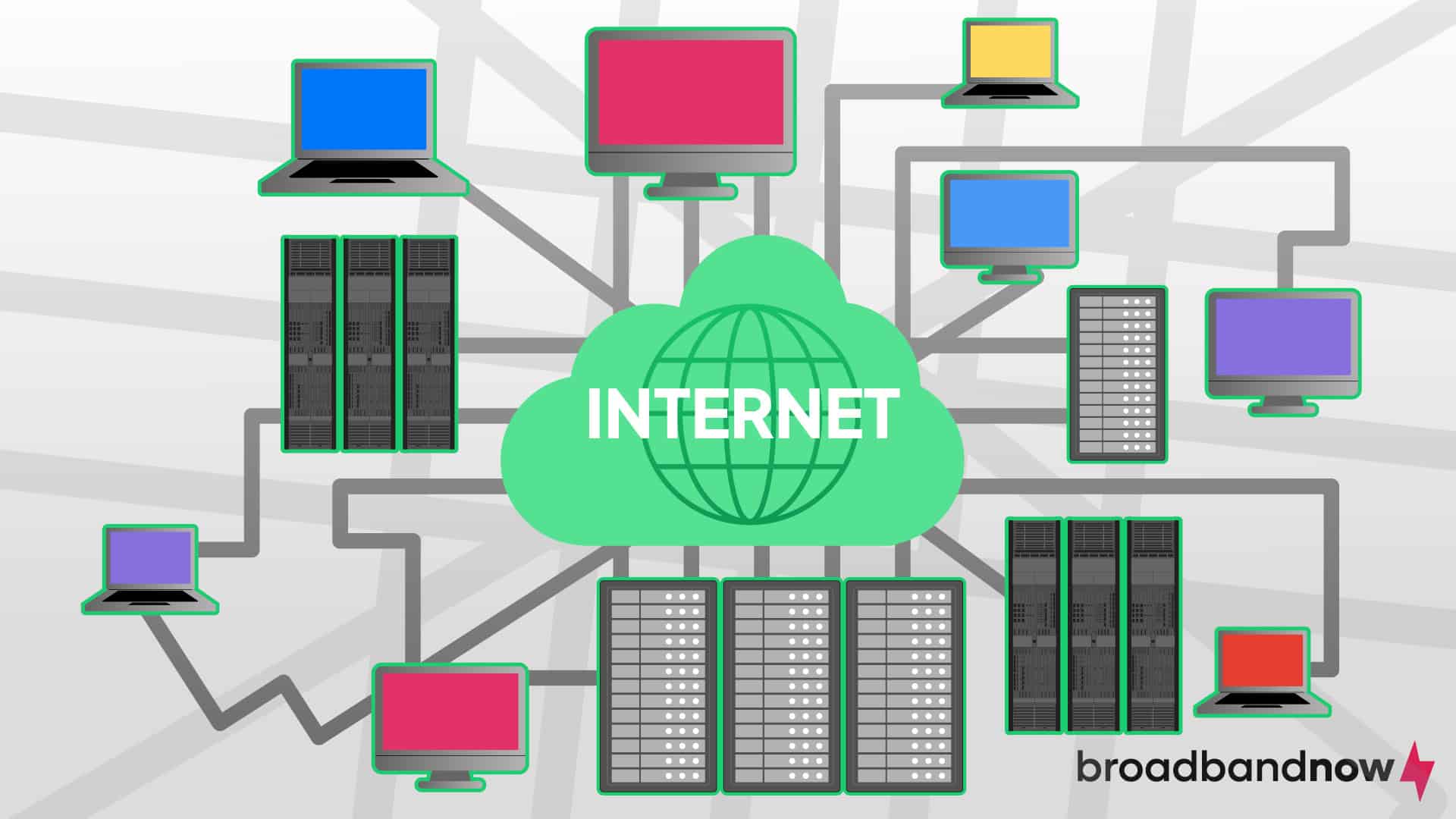
The internet can seem like an incomprehensible thing that lets us share information at the speed of light. That’s a nearly accurate description, but the internet isn’t impossible to understand. Humans created it, so we have a solid understanding of what it is, how it works, and what it can do. Curious about the inner workings of the technology that’s a crucial part of our everyday lives? Here’s everything you need to know about how the internet works.
Our Video on How the Internet Works
Prefer a spoken explanation of how the internet works? Watch our video where we break it down in simple terms to help you understand the ins and outs of the internet.
What Is the Internet?
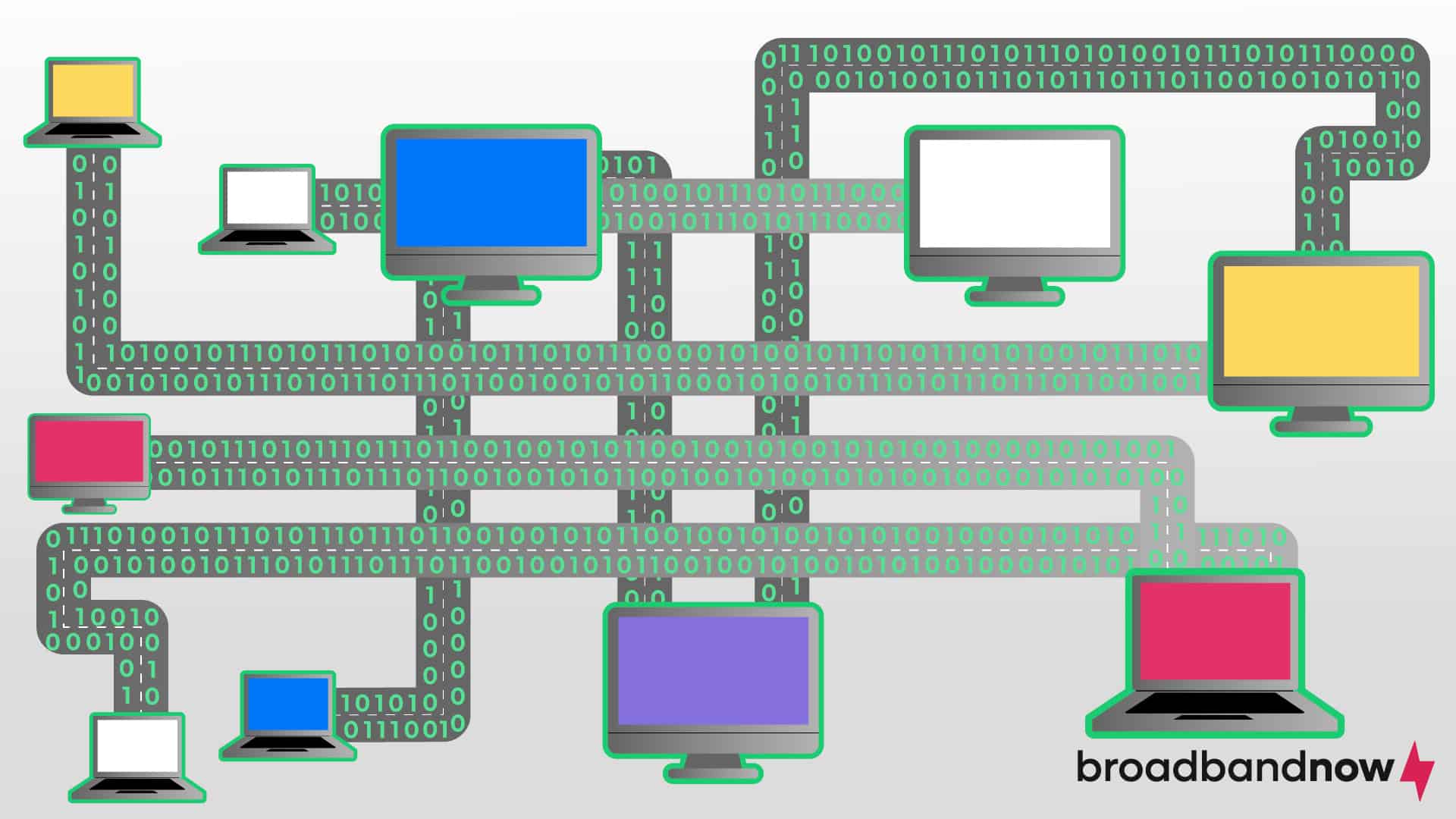
The internet is a web of interconnected computers that send and receive information. Computers and similar devices are designed to communicate with each other to form connections made up of packets of information. These connections make up the interactive network we know as the internet.
The nature and infrastructure of the internet can be difficult to understand on its own. That’s why many tech experts and computer engineers use metaphors to describe the internet and its functions. The “World Wide Web” was one of the first metaphors used to describe the internet’s size and structure.
Before the advent of the internet, words like “cyberspace” and “website” didn’t exist. No internet metaphor is perfect, but it may be helpful to think of the internet as a large system of roads. Highways and interstates connect smaller streets and roads to the broader system. Various organizations at the local and national levels govern the entire system, but no international body controls it.
Information moves like vehicles, traveling from one point to another through the network of roads. Even if a road is closed or needs repair, the flow of traffic can be rerouted via an alternate path. As the population grows, more roads can be added, ensuring that the system is constantly growing and improving.
Most homes and businesses connect to the road network through driveways, much like homes and businesses connect to the internet through local networks. Whenever you want to access the road (internet), you can easily turn on your car (device) and join the rest of the traffic. In doing so, you can access everything connected to the road (internet).
A Brief History of the Internet
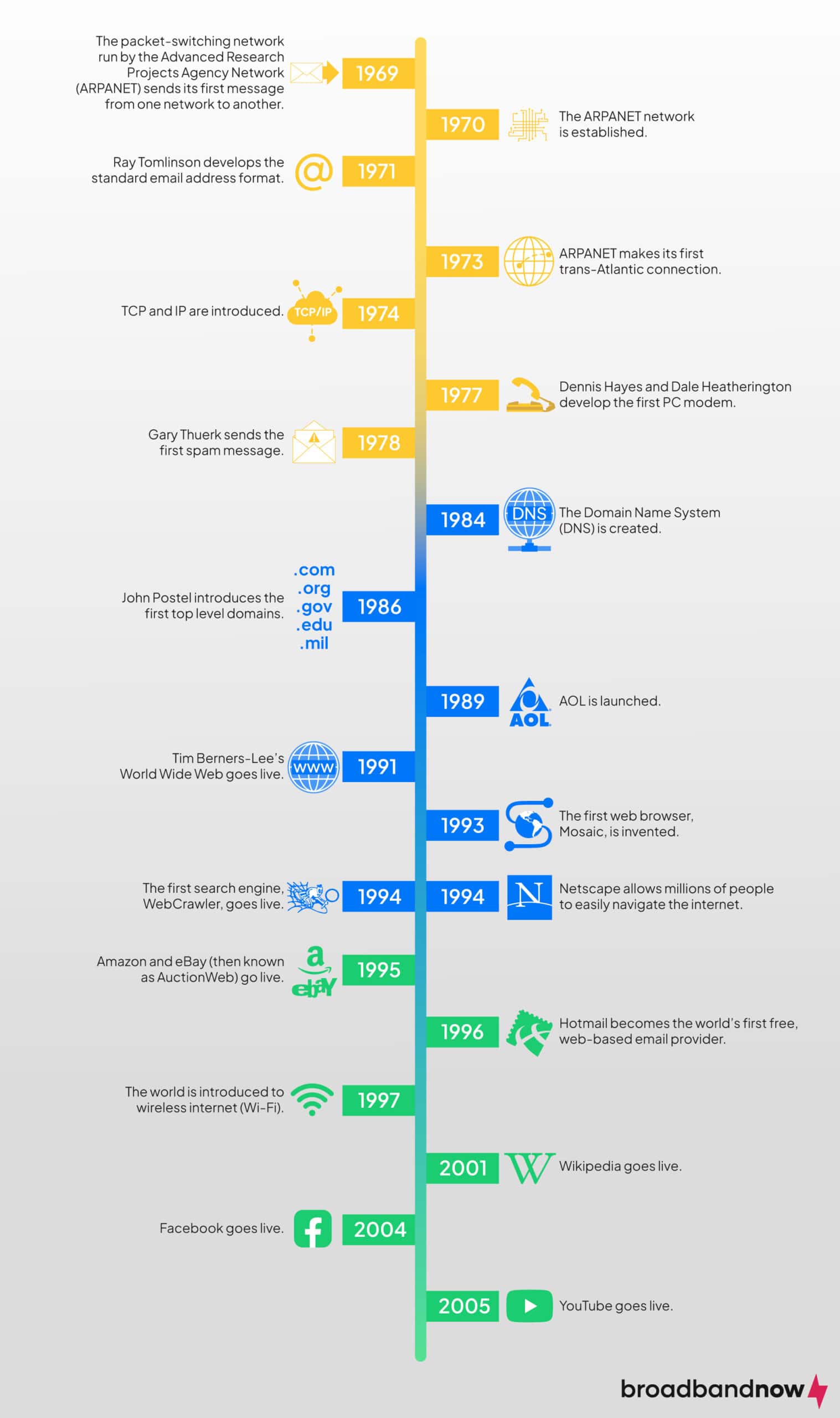
The internet we know today isn’t exactly the same as it was when it was created. It continues to grow very rapidly. In the beginning, it connected just two networks. Today, millions of networks and devices share information across the internet.
Glossary of Basic Internet Terms
Below is a quick glance at internet terms you should be familiar with:
- Modem: A device that brings the internet into your home from your ISP. It usually connects to a router.
- Router: A device that sends internet from your modem to your devices. Think of it as a traffic manager for your home network.
- Ethernet: A type of wired connection that links your device directly to your modem or router.
- Server: A powerful computer that stores websites, apps or files, and sends them to your device when requested.
- DNS (Domain Name System): Like the internet’s phonebook, it turns website names (like www.google.com) into addresses that computers understand.
- URL (Uniform Resource Locator): The “address” of a website you type into your browser.
- Browser: A program or app used to access websites on the internet.
- App (Application): A program on your device that lets you do specific things, like check email or watch videos.
- IP Address: A unique number that identifies your device on the internet, like a home address for your computer.
- Firewall: A security tool that helps block unauthorized access to your device or network.
- Bandwidth: The amount of data your internet connection can handle at one time. (Higher bandwidth means faster downloads and smoother streaming.)
- Cloud: Online storage or services you can access from anywhere, like Google Drive or iCloud.
- Streaming: Watching videos, listening to music, or playing content online without downloading it first.
- Bookmark: A saved shortcut to a website so you can visit it easily later.
How Does the Internet Work?
The road and highway metaphor may give you a better idea of the internet as a whole, but it doesn’t really tell you how it all works. Two fundamental terms you should know are packets and protocols. Once you understand those two concepts, you can better comprehend how the internet functions.
What Are Packets?
When computers exchange information, every message contains a packet, or part of a message. The header of a packet contains information about the packet’s contents. It goes at the front of the message so the device receiving the message knows what to do with it.
When one device sends information to another, the entire message is broken into packets, which are then broken into bits. A bit is the smallest measurable unit of digital information, and it can be represented by a one or a zero. Bits and packets are routed to their destination, where they are reassembled into their original format.
Computers use a two-symbol language known as binary code to speak to one another.
Packets are sent through a process known as packet switching, in which routers and switches process packets before they arrive at their destination. That technique ensures that no connection takes precedence over another in the larger network.
What Are Protocols?
In computing, a protocol is a standardized way to perform an action or format information. Because thousands of devices run different systems, the internet must be compatible with all of them. Protocols ensure that any internet-ready device can connect to the network. However, different protocols serve different purposes. Two of the most important are Internet Protocol (IP) and Transmission Control Protocol (TCP).
What Is Internet Protocol (IP)?
The IP is responsible for delivering packets from one device or network to another. When you have two different devices or systems connecting to the internet, you need a way to translate the information for each network. Every network is assigned an IP address, while every packet contains information (in the header) that says what it is, where it’s coming from, and where it’s going. The IP ensures that every packet can be read, disassembled, relayed to the correct location, and reassembled.
IP is similar to any process you use when sending or receiving an item. If you want to mail a package to your friend, for example, you’ll need to put it in a box or envelope that meets the post office’s standardized size requirements. You’ll also need to put down the relevant information for the sender (you) and the recipient. If you put the information in the wrong place or in the wrong order, your package will likely end up in the wrong place.
The IP works in much the same way. Every packet must have the right information so different routers and switches can interpret where it is coming from and where it is going, making the IP an essential component of the internet.
What Is Transmission Control Protocol (TCP)?
TCP works in tandem with IP to ensure that packets are sent correctly between networks. When a packet is sent, TCP first reads the packet header and establishes a connection with the recipient. TCP then ensures the packet’s contents (known as the payload) arrive at their destination in the correct order.
Using TCP, the recipient network must acknowledge receipt of every packet. If TCP does not receive acknowledgments for certain packets, it resends them. Missing packets can slow down the process.
Returning to the package metaphor, TCP is like a processing or distribution center. Packages and letters arrive at the facility, where they’re sorted and routed to the correct location. If information is in the wrong place or missing, it may delay the process.
How Does a Network Work?
Now that you have a better understanding of the processes that connect multiple networks, you may be curious about how your home network (or any network) actually works. A computer network requires some kind of node to exist. A node is any device that can send, receive, or forward information. That could be a computer, server, switch, smartphone, smart TV, or smart-home device. Each node in a network uses a unique address, such as an IP address, to communicate with other nodes.
To connect to the internet, a network must interface with an internet service provider (ISP). You can establish that connection in various ways, depending on the service and technology available. Wired connections include fiber optic, DSL, and cable internet, while wireless connections refer to satellite, fixed wireless, and 5G home internet.
Routers manage the communication between different networks. They analyze the data being sent and determine the best path for it to reach its destination. Routers connect your home network to the internet (via a modem) and manage data traffic between your home devices and the outside world. They use various routing protocols to ensure that data packets are delivered efficiently and accurately.
Types of Internet and How They Work

There are different types of broadband connections available, each varying in how they supply internet to homes. These include wired options such as fiber optic, DSL, and cable, as well as wireless options such as satellite, fixed wireless, and 5G home internet. Each type transmits data differently, which affects speed, reliability, and availability.
How Does Cable Internet Work?
Cable internet uses the same coaxial cables that deliver cable television services to provide internet access. The ISP sends data signals through the cables, which are capable of carrying a wide range of frequencies. In your home, a cable modem receives the signals and converts them into a form that your computer and other devices can use. The modem connects to a router, which then distributes the internet connection to various devices wirelessly or through Ethernet cables.
Cable internet uses a system called the Data Over Cable Service Interface Specification (DOCSIS), which enables high-speed data transfer and efficient bandwidth use. Because cable internet operates on a shared network, however, it divides bandwidth among multiple users in the same geographic area. That means internet speeds can fluctuate based on local network usage, often slowing during peak times when many people are online at once. Cable internet remains popular because of its wide availability and generally high speeds.
How Does Fiber Internet Work?
Fiber internet transmits data as light signals through strands of glass or plastic fibers, which are bundled together in fiber-optic cables. Fiber-optic cables can carry data at much higher speeds and over longer distances than the traditional copper cables used in DSL or cable internet — and with minimal signal loss. At the source, the ISP converts electronic data signals into light pulses, which travel through the fiber-optic network to reach your home. Once there, an optical network terminal (ONT) converts the light signals back into electronic data that computers and other devices can use.
The primary advantage of fiber internet is its ability to provide extremely high bandwidth, enabling faster upload and download speeds, lower latency, and greater reliability than other internet connections. That makes fiber internet particularly suitable for bandwidth-intensive activities such as streaming high-definition video, online gaming, and supporting multiple devices simultaneously.
How Does DSL Internet Work?
DSL (digital subscriber line) internet transmits data over traditional copper telephone lines. Unlike dial-up internet, which also uses telephone lines but ties up the line for phone calls, DSL operates on frequencies that don’t interfere with voice communication, allowing you to use the internet and make phone calls simultaneously. An ISP sends data signals through the telephone lines to a DSL modem in your home. The modem then decodes the signals and provides an internet connection that can be used by computers and other devices through a router.
DSL internet speeds are typically slower than cable or fiber-optic connections, but they’re sufficient for many standard internet activities such as browsing, emailing, and streaming video. The speed and quality of a DSL connection can vary based on the distance between your home and the nearest telephone exchange or central office. The closer you are to the exchange, the better the connection will be. DSL is a widely available and reliable option for internet access, particularly in areas where cable and fiber-optic infrastructure are not yet established.
How Does Satellite Internet Work?
As the name implies, satellite internet uses satellites orbiting the Earth to provide internet access, particularly in remote or rural areas where traditional wired connections are unavailable. The process begins with an ISP sending data to a satellite in geostationary orbit. The satellite then relays the data to a dish installed at your home. The dish, mounted on the roof or in an open area with a clear line of sight to the sky, captures the signal and transmits it to a modem inside the home. The modem then converts the signal into an internet connection that various devices can use.
Satellite internet can cover vast geographical areas and provide connectivity where other types of internet are impractical, but it often suffers from higher latency due to the long distance the data must travel between the Earth and the satellite. That latency can cause noticeable delays, particularly in video calls and online gaming. Satellite internet speeds can also be affected by weather conditions and physical obstructions. Advancements in satellite technology continue to improve the reliability and performance of satellite internet services.
How Does Fixed Wireless Internet Work?
Fixed wireless internet transmits data through radio signals between two fixed points: a base station and a receiver installed at your location. The base station, operated by an ISP, broadcasts a signal to a fixed antenna or dish mounted on your home or property. The receiver captures the signal and transmits it to a modem inside the home, which then converts the signal into an internet connection that can be used by various devices, either directly or via a router.
Fixed wireless internet is useful in rural or underserved areas where traditional wired connections, such as DSL, cable, or fiber, are unavailable or cost-prohibitive to install. It can offer high-speed internet access with relatively low latency compared to satellite internet, because the data does not have to travel as far. However, the connection’s quality and reliability can be affected by physical obstructions such as trees, buildings, and terrain, as well as weather conditions.
How Does 5G Home Internet Work?
5G home internet uses the fifth generation of wireless technology to provide high-speed internet access to homes, using cellular networks to deliver data. An ISP sets up 5G towers that emit high-frequency radio waves, which are received by a 5G modem or router installed in your home. The modem converts the radio signals into an internet connection that can be used by various devices, either wirelessly or through Ethernet cables.
The primary advantage of 5G home internet is its potential for extremely high speeds and low latency, making it suitable for bandwidth-intensive activities such as streaming 4K video, online gaming, and supporting multiple smart devices simultaneously. Because 5G doesn’t require extensive physical infrastructure like cables or fiber optics, it can be deployed faster and is often more cost-effective, especially in areas where laying traditional internet cables would be challenging.
However, 5G home internet performance can be affected by network congestion, distance from the 5G tower, and physical obstructions, and ongoing advancements in 5G technology aim to mitigate these issues and improve overall service reliability.
Internet vs. World Wide Web
People often use the internet and the World Wide Web (WWW) interchangeably, but they refer to different aspects of digital connectivity. The internet is the global network that provides the foundation for various services, while the World Wide Web is one of those services, specifically focused on accessing and sharing web-based content.
The internet is a global network of interconnected computers and other devices that communicate using standardized protocols such as IP or TCP. It provides the underlying infrastructure for various forms of digital communication, including email, file transfer, online gaming, and streaming services. The internet is a vast network that connects billions of devices worldwide, enabling them to exchange data.
The World Wide Web is a system of interlinked hypertext documents and multimedia content accessed via the internet. Developed by Tim Berners-Lee in 1989, the WWW operates through web browsers such as Chrome, Firefox, and Safari, which retrieve and display web pages from web servers. The WWW uses the HTTP/HTTPS protocol to facilitate the transfer of web pages, which are often written in HTML and can include text, images, videos, and other multimedia elements.
Using the road analogy, imagine the internet as an expansive system of interconnected highways that span the globe, facilitating the movement of various types of vehicles (data packets). The highways represent the physical infrastructure and pathways through which data travels between different locations worldwide. The WWW is a specific system of interconnected roads and streets within cities and towns, lined with buildings (websites) that contain information. Just as highways are part of a larger transportation network that includes local roads and streets, the WWW is a subset of the internet, focusing specifically on accessing and navigating web pages and multimedia content through web browsers.
How to Work the Internet: A Beginner’s Guide
Getting online for the first time can feel confusing. Once you get used to the steps, using the internet will become second nature. Here’s a simple, step-by-step guide to help you get online.
- Turn on your device. Get your laptop, desktop, tablet, or smartphone and power it on. Make sure it’s charged or plugged in.
- Connect to your internet service. You will need to have home internet set up already to get online. You can get internet from an internet service provider (ISP) in your area, and a modem or router to get your Wi-Fi running. Once you have that, you’ll connect to Wi-Fi. On your device, find the Wi-Fi icon, select your network, and enter the password. If you’re using a mobile device, your smartphone or tablet will connect automatically.
- Check your connection. Look for a Wi-Fi or network symbol to ensure your device is connected. A full signal means you’re ready to go online.
- Open a web browser. Browsers are apps that let you access websites. Popular options include Google Chrome, Safari, Firefox, and Microsoft Edge.
- Visit websites or apps. Type a URL (like www.google.com) into the browser’s address bar or open an internet-enabled app (like Facebook). You can now search for information, watch videos, send emails, or explore social media.
- Stay safe online. Remember basic online safety: use strong passwords, avoid clicking unknown links, and update your software regularly.
Frequently Asked Questions About the Internet
What is Wi-Fi?
Wi-Fi lets devices connect to the internet wirelessly, without a cable. Most homes, offices, and public spaces have Wi-Fi networks that you can join with a password. It’s what allows laptops, tablets, smartphones, and smart home devices to access the internet at the same time.
What’s the difference between mobile data and internet?
The internet is the global network of computers, servers, and websites that lets you share and access information. Mobile data is one way to connect to the internet using your phone carrier’s network. While Wi-Fi uses a local network connected to your ISP, mobile data travels over cellular towers. Mobile data is convenient for on-the-go access, but it can use up your data plan, while Wi-Fi usually has no limits once connected.
How can I stay safe online as a beginner?
Online safety is crucial, especially if you’re new to the internet. Use strong, unique passwords for accounts and change them regularly. Avoid clicking unknown links or downloading files from untrusted sources. Keep your devices updated to protect against security threats. Only share personal information on secure, trusted websites (look for a padlock in the browser’s address bar). Consider using antivirus software or a firewall to add extra protection.
Who runs the internet?
The internet is a decentralized network of networks that no single entity or organization owns or controls. Instead, it operates through a collaborative effort involving numerous stakeholders, including governments, private companies, nonprofit organizations, and academic institutions. Those entities work together to develop and maintain the technical standards, protocols, and infrastructure that enable the internet to function globally.
Is the internet physically connected?
Yes, the internet is physically connected through a vast network of cables, fiber optics, and wireless transmission systems that span the globe. The physical connections, often referred to as internet backbone networks, link thousands of networks operated by internet service providers, telecommunications companies, and other organizations.
What keeps the internet going?
The internet’s distributed nature, with multiple pathways, ensures that if one part of the network fails or becomes congested, data can reroute through alternative paths. Ongoing investments in infrastructure by ISPs, telecommunications companies, and technology firms maintain and expand the physical networks that make up the internet backbone.
Could the internet be shut down?
The internet is highly resilient because of its decentralized, distributed nature, making it extremely difficult to shut down worldwide. Localized disruptions, however, can occur due to natural disasters, infrastructure failures, cyberattacks, or government actions such as censorship or shutdowns of specific services or networks within their jurisdiction.