
Everything to Know About Satellite Internet for RVs and Vans
Satellite internet is an ideal way to stay connected while on the go, but it comes with some caveats.

- Aim for Starlink Roam if you regularly travel beyond cellular coverage, especially in rural or off-grid areas. While cellular hotspots can handle most everyday travel needs, satellite internet becomes a more reliable option when you’re camping far from towns or cell towers.
- Use a cellular hotspot as your primary connection when coverage is strong. Hotspots are typically cheaper, easier to set up, and use far less power than satellite systems, making them ideal for RV parks, highways, and areas with consistent 4G LTE or 5G service.
- Plan for real-world setup factors such as power consumption, sky visibility, and equipment setup time. Satellite internet requires an unobstructed sky and more power, and it takes more effort to deploy and store, so it works best when you’re prepared for the extra logistics.
Satellite internet has changed dramatically in recent years. For RV owners, van lifers, and full-time travelers, it’s no longer just a backup option in remote locations. Thanks to low-Earth orbit (LEO) satellite providers like Starlink, satellite internet can now provide speeds and responsiveness that support video calls, streaming, remote work, and everyday connectivity from places far beyond the reach of traditional broadband.
While legacy satellite providers like HughesNet and Viasat still serve many rural customers, newer mobile-focused services have made satellite internet a practical primary connection for travelers. Whether you’re boondocking on public lands, spending months on the road, or simply looking for a reliable backup to cellular service, understanding the strengths and tradeoffs of satellite internet can help you choose the right setup for your RV lifestyle.
Quick Answer: Is Satellite Internet Worth It for RVs?
- Choose Starlink Roam if you regularly travel or camp in remote areas without reliable cellular service.
- Choose a cellular hotspot if you mostly stay near towns, highways, or RV parks with strong 4G/5G coverage.
- Choose both if you work remotely or want backup connectivity when one system fails.
- Most full-time RVers use a combination: cellular for everyday use and Starlink for remote travel.
Watch: Everything to Know About Satellite Internet for RVs and Vans
Prefer a quick answer? Our video breaks down what RVers need to know about satellite internet, including Starlink Roam, requirements, campsite setup, and other must-know details.
What Is RV Satellite Internet?
Satellite internet transmits data between a dish antenna and a satellite orbiting Earth. The satellite sends and receives signals to and from a network operations center on the ground that’s connected to the internet. The process involves a satellite modem at an installed location, which converts the satellite signals into internet data and vice versa. This technology enables you to access the internet from virtually anywhere, as long as you have an unobstructed view of the sky.
Satellite internet is an excellent option for those living or traveling in RVs and vans because it provides reliable internet access regardless of location. Traditional wired internet services, such as cable or fiber, are often unavailable in remote or rural areas, where you’re likely to find yourself while traveling. Satellite internet bridges this gap to provide connectivity for work, communication, navigation, and entertainment. Recent advancements in satellite technology, particularly with low-Earth orbit (LEO) satellites, have improved typical connection speeds and latency compared with older satellite systems, making satellite internet a more viable and practical solution for mobile lifestyles.
The Pros and Cons of Satellite Internet

Understanding the pros and cons of satellite internet can help you decide whether this type of internet connection makes sense for your needs. Depending on your travel style, the drawbacks may outweigh the benefits of a reliable connection.
Pros
- Available in remote locations
- Independent of local infrastructure
- Portable and flexible
- Can provide reliable connectivity
Cons
- Higher latency compared to wired connections
- Weather can affect signal quality
- Generally higher cost
- Limited data plans with the potential for throttling
| Satellite internet is great for… | Satellite internet may not be ideal for… |
|---|---|
|
|
Required Equipment for Satellite Internet
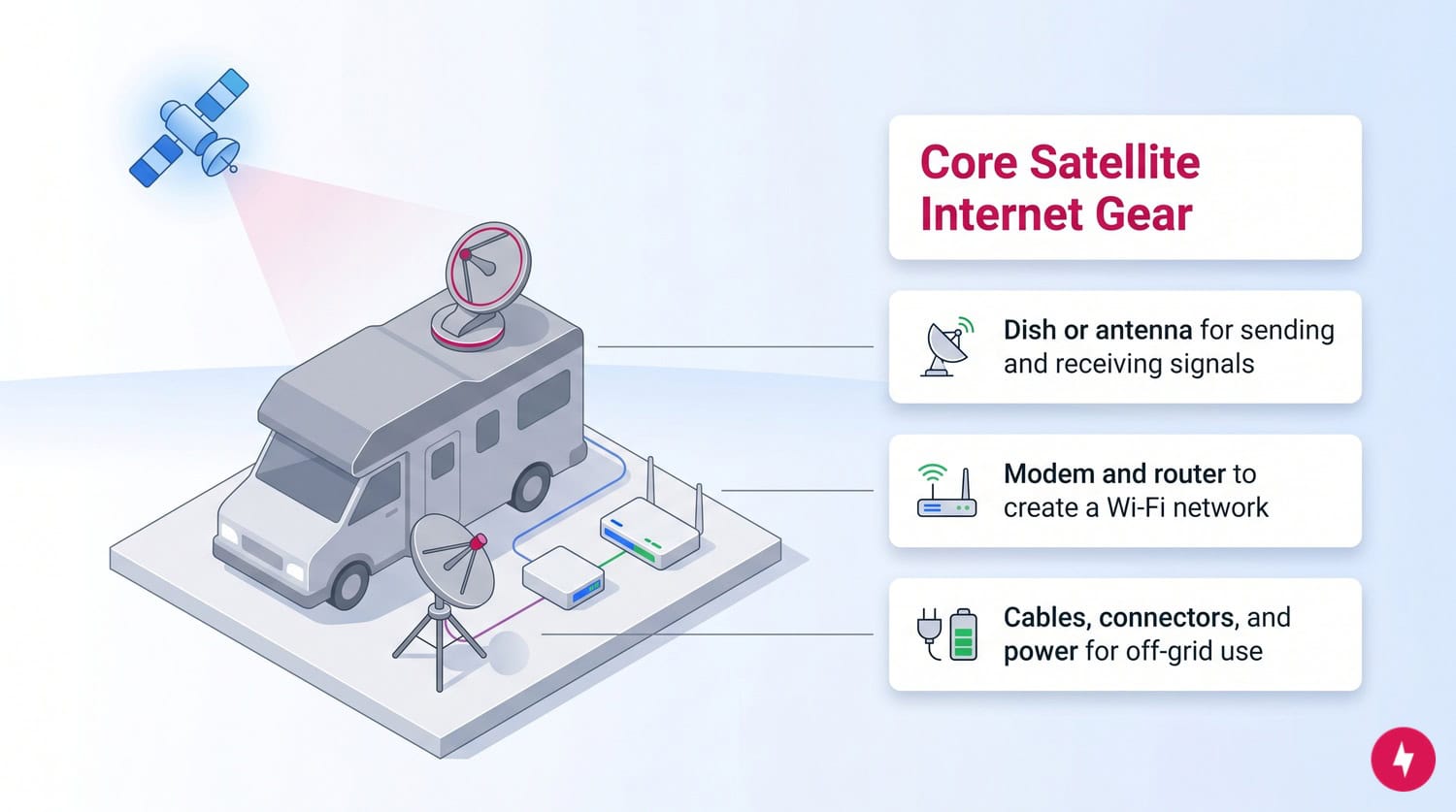
A nomadic lifestyle often means downsizing your belongings and traveling light. You will need a small collection of equipment to access and use your satellite internet. In general, you’ll need to keep the following in your RV or van:
- Satellite Dish/Antennas: Receive signals from the satellite and transmit signals to it. Portable satellite dishes or roof-mounted antennas are common for RVs and vans. Mounted dishes or tripod satellite dishes are common for remote satellite users.
- Mounting Equipment: Secures the satellite dish or antenna to your vehicle, ensuring stability and proper alignment with the satellite.
- Satellite Modem: Converts the satellite signal into internet data.
- Router: Distributes the internet connection wirelessly to multiple devices within your vehicle.
- Cables and Connectors: Connect the satellite dish/antenna to the modem and the modem to the power supply and router.
- Power Supply: Ensures that the satellite modem and dish/antenna have the necessary power, which might include inverters or portable power sources for off-grid use.
So, how does the equipment work to access your signal? If you’re using a mounted satellite dish, it folds down when moving and is usually controlled electronically from inside the cabin. Mounted satellite dishes vary in size, but if you’re traveling in a smaller vehicle, you may be limited in terms of how large a dish you can mount on the roof. Smaller satellite dishes cover a smaller area of the sky, which will impose limits on the internet quality you’re able to receive.
Smaller, manual satellite dishes are available regardless of vehicle size. These smaller dishes are usually on a tripod or other stand and can be moved around to improve the connection, but using a repositionable tripod dish requires more work and manual calibration. If you’re traveling to areas where you may encounter inclement weather or other environmental factors, a repositionable dish could be a better option for you.
If you have a residential satellite plan, your home connects to a satellite receiver dish, usually mounted on your roof or on a stand in an open area, with a clear view of the southern sky if it’s a very large dish. Satellite internet is only available in your home and isn’t mobile. Satellite receivers work by scanning the sky for a satellite uplink to connect to. This is simple on a residential satellite plan since your location doesn’t change. When you’re traveling and using satellite internet for your RV or van, every time you deploy your satellite dish, you need to get your location coordinates so the dish can accurately scan the sky.
Starlink Roam vs Legacy Satellite Providers
Today’s RV internet market is largely divided between modern low Earth orbit satellite internet providers and traditional geostationary satellite providers. The biggest difference is latency. Because Starlink’s satellites orbit much closer to Earth, users typically experience a more responsive connection for activities such as video conferencing, cloud applications, and online gaming.
Legacy satellite services from HughesNet and Viasat remain viable options for travelers with lighter internet needs, but they generally have higher latency and are less suited to real-time applications.
| Provider | Monthly cost | Download speeds (up to) | Upload speeds (up to) | Data caps | Contracts |
|---|---|---|---|---|---|
| Starlink | $55 to $175 | 400 Mbps | 100 Mbps | Unlimited (subject to network management during peak times) | None |
| Viasat | $39.99 to $109.99 | 200 Mbps | 12 Mbps | Plans may range from roughly 40 GB of high-speed data to options marketed as unlimited, with speed throttling after a threshold | None |
| HughesNet | $39.99 to $94.99 | 100 Mbps | 25 Mbps | Common plan options provide around 100 to 200 GB of priority data per month | Often 24 months on standard plans |
Starlink Roam (Low-Latency Satellite Option)
Starlink Roam is designed for travelers who need internet access away from a fixed address. The service uses a constellation of low Earth orbit satellites, delivering significantly lower latency than traditional satellite systems. This makes it one of the most popular options among full-time RVers, remote workers, and digital nomads. Depending on your service plan and network conditions, users can support activities like video calls and streaming in many locations, provided coverage and network conditions allow.
HughesNet (Legacy Satellite for Light Use)
HughesNet remains a practical option for users whose internet needs center on browsing, email, messaging, and occasional streaming. Because it relies on geostationary satellites much farther from Earth, latency is considerably higher than with modern LEO services. However, HughesNet may still appeal to seasonal travelers seeking reliable service and broad coverage.
Viasat (Traditional Satellite Coverage Option)
Viasat remains an option for RVers already familiar with traditional satellite internet who prioritize coverage over low latency. However, compared to modern LEO systems, it’s generally less responsive for video calls and other real-time applications.
Typical RV Internet Setups
- Weekend camper: Cellular hotspot as primary connection, with campground Wi-Fi as backup.
- Remote worker: Starlink Roam for primary connectivity, with a cellular hotspot for backup.
- Full-time boondocker: Starlink Roam for remote coverage, with an unlimited cellular plan for backup and a solar + lithium battery system for off-grid power.
The Check Your Campsite Guide

One of the biggest differences between satellite internet and cellular service is the need for a clear view of the sky. Imagine pulling into a heavily wooded campsite in the Smoky Mountains. Your cellular signal may still work because nearby towers can penetrate some tree cover. But Starlink needs a wide view of the sky. A campsite that looks perfect for shade could result in frequent disconnects if the dish cannot see enough satellites overhead.
With modern satellite systems such as Starlink, trees, mountainsides, nearby buildings, and other obstacles can block portions of the satellite network, creating service interruptions. This is commonly called an “obstruction.”
Before setting up camp, many experienced RVers evaluate their campsite with satellite connectivity in mind. A heavily wooded campsite that looks perfect for shade may not provide enough open sky for reliable service.
The Starlink app includes an obstruction-checking tool that uses your phone’s camera to evaluate the sky above your campsite. Running this check before parking can help you determine whether you’ll have a reliable connection or need to reposition your RV or satellite dish. For the best results, choose a location with the widest possible view of the northern sky and avoid parking directly beneath dense tree cover.
Power Consumption Analysis
For RVers who boondock or camp off-grid, power consumption is often as important as internet performance. Unlike cellular hotspots, which typically draw very little power and can run all day from a USB battery pack, satellite internet equipment requires significantly more energy. A Starlink system must continuously power both the router and the dish, making it one of the larger electrical loads in many RV internet setups.
This increased power demand can affect battery runtime, especially for travelers relying on solar power, lithium battery banks, or portable power stations. Some RV owners use inverters to convert battery power into household AC power for the satellite equipment, while others install aftermarket 12-volt conversion solutions to improve efficiency.
If your travel style involves extended stays away from hookups, be sure to factor internet equipment into your overall power budget. In many cases, a cellular hotspot may be the more battery-friendly option when adequate cellular coverage is available.
| Internet option | Typical power demand | Best for |
|---|---|---|
| Cellular hotspot | Very low | Solar-powered campers |
| Starlink Roam | Moderate to high | Travelers prioritizing connectivity |
| Roof-mounted cellular setup | Low | Frequent travelers |
Hardware Storage And Setup

Internet equipment logistics is an often-overlooked part of RV connectivity. Portable satellite systems typically require users to unpack, position, and connect the dish each time they arrive at a new campsite. Depending on terrain and tree coverage, you may need to move the dish multiple times before finding a location with an unobstructed view of the sky.
Storage is another consideration. The dish, router, cables, and mounting accessories all require dedicated space inside your RV or van while traveling.
By comparison, a cellular-based setup can be much simpler. Many RVers install roof-mounted cellular antennas that remain permanently attached to the vehicle and require little to no setup when arriving at camp. While cellular service isn’t available everywhere, the convenience factor is difficult to ignore.
Travelers who move frequently may want to balance satellite performance benefits against the additional setup time required at each stop.
Contract Flexibility
Many RV owners use their vehicles seasonally rather than year-round, so billing flexibility matters when comparing internet providers. One advantage of modern mobile satellite plans is the ability to pause service when it isn’t needed. Rather than paying for connectivity during months when the RV is in storage, eligible users may be able to suspend billing and reactivate service before their next trip.
This flexibility can make satellite internet more affordable for occasional travelers, snowbirds, and seasonal campers who only need connectivity during part of the year. Before signing up, review the provider’s current plan details, pause policies, and reactivation requirements, as these features can change over time.
Cellular Hotspot vs Satellite: Which Is Best?

For many RVers, the best internet solution isn’t satellite or cellular; it’s both. Cellular hotspots are generally less expensive, easier to set up, and significantly more power-efficient than satellite internet. When strong 4G LTE or 5G coverage is available, a hotspot may provide excellent speeds with minimal equipment.
Satellite internet offers a different advantage: coverage. In remote deserts, mountains, national forests, and other areas with little or no cellular service, satellite internet can keep travelers connected where hotspots simply stop working.
A cellular hotspot is often the better choice for travelers who spend most of their time near populated areas. Satellite internet becomes increasingly valuable as your adventures take you farther from cellular infrastructure. Many full-time RVers carry both solutions, using cellular service as their primary connection and satellite internet as a backup for remote destinations.
How Much Does Satellite Internet Cost?
Depending on your satellite provider and internet plan, you’re generally looking at a monthly cost that often starts around $50–$70 and can exceed $150 for higher-speed or mobile-focused options. Unlike wired internet, such as cable and fiber, your plan options are usually more limited when choosing satellite internet. Equipment costs can get quite pricey but are often a one-time fee. For many popular services, you can expect standard hardware to cost several hundred dollars, though some providers let you lease the equipment for an additional monthly rate instead of paying everything upfront. Installation costs are another factor, and Starlink emphasizes that its service is designed for self-installation without a professional. Viasat and HughesNet, however, typically require professional installation, which can add an extra one-time fee.
In short, satellite internet isn’t the cheapest option when you consider all these fees. Because of the larger equipment and complex installation, you’re unlikely to avoid these costs when choosing a satellite internet plan. Satellite internet providers also implement soft and hard data caps, which can cost you data overage fees if you go over the limit. Still, it might be worth the investment as most of these costs are one-time and upfront rather than extended over a long period of time.
Before You Buy RV Satellite Internet
Ask yourself these five questions:
- Do I frequently camp outside cellular coverage?
- Do I have enough battery capacity to power satellite equipment?
- Am I comfortable setting up and storing a satellite dish?
- Will I use the service year-round or only seasonally?
- Do I need internet for remote work, streaming, or just basic browsing?
If you answered “yes” to most of these questions, satellite internet is likely worth considering.
Is Satellite Internet Right for You?

Frequent travelers will likely choose satellite internet if they want to stay connected in rural areas.
Assess your typical internet usage patterns, frequented locations, and how important constant connectivity is to decide whether satellite internet fits your needs. Consider how much data you use, the types of online activities you do (such as streaming, browsing, or video conferencing), and whether you often end up in areas with poor or no cellular coverage. If reliable internet access is crucial for work, navigation, or staying connected, satellite internet might be a good fit.
As you search for the right provider, consider cost, data limits, speed, and latency. Compare different service providers to find plans that offer sufficient data at reasonable speeds and costs. It’s also essential to evaluate the setup and maintenance requirements of satellite equipment and the potential for weather-related disruptions. Seek out reviews and discuss options with fellow digital nomads to see what’s working for others in your position.
You’ll likely weigh satellite internet against other popular wireless options, such as fixed wireless or 5G internet. Satellite internet can be a better option due to its extensive coverage and independence from local infrastructure. While fixed wireless and 5G rely on proximity to cell towers and may be unavailable in remote or rural areas, satellite internet can provide connectivity anywhere with an unobstructed view of the sky.
The right RV internet setup depends on where you travel, how often you work online, and how much power and equipment you’re willing to manage. Travelers who frequently camp in remote locations may find Starlink Roam worth the added cost and power requirements, while occasional RVers may be well served by HughesNet, Viasat, or a cellular hotspot. For maximum reliability, many experienced RVers combine cellular and satellite connectivity to stay connected wherever the road leads.
Alternatives to Satellite Internet in an RV
While satellite internet can be a reliable internet option, the cost is quite high and may be outside of your budget. Luckily, there are other options you can choose from if satellite internet isn’t right for you.
- Fixed Wireless: This type of wireless internet uses radio signals to deliver internet service from a local base station to a fixed antenna at your location. It can provide high-speed internet but requires a clear line of sight to the base station. This can be challenging in densely forested areas or hilly terrain, and its availability is typically limited to certain regions.
- 5G Internet: An attractive option for travelers who need high-performance internet, 5G internet is still improving but is mainly available in urban and suburban areas. 5G hotspots can be used to create a Wi-Fi network on the go, providing robust internet access wherever 5G signals are strong. However, be aware of potential data caps and the current limitations in 5G coverage in rural and remote areas.
- Cellular Data Plans: Data plans from mobile carriers, often paired with 4G LTE or 5G devices, can provide high-speed internet access wherever cellular coverage is available. Some carriers offer unlimited data plans, but check for throttling or data cap policies.
- Mobile Hotspots: A mobile hotspot device can create a Wi-Fi network using cellular data. These devices are portable and can connect multiple devices at once. They’re ideal if you need to share the connection among several gadgets.
- Public Wi-Fi: Many RV parks, campgrounds, cafes, and libraries offer free Wi-Fi. While this option is cost-effective, it often comes with security risks, slower speeds, and unreliable connectivity. It’s suitable for occasional use but may not be reliable for work or continuous connectivity.
RV Internet Is No Longer One-Size-Fits-All
Ten years ago, RV internet usually meant searching for campground Wi-Fi or hoping for a cellular signal. Today, satellite internet has become a realistic primary connection for many travelers. While Starlink Roam has transformed connectivity in remote locations, it’s not the perfect solution for every RVer. Power consumption, campsite obstructions, equipment storage, and monthly costs all deserve consideration. The best RV internet setup depends less on speed claims and more on where you travel and how you power your gear. Starlink Roam makes remote connectivity possible in places where cellular networks don’t reach, but it requires more power and a more involved setup. For many RVers, combining cellular and satellite internet provides the most reliable balance of coverage, cost, and convenience.
Frequently Asked Questions About Satellite Internet For RVs
Is satellite internet good for remote work?
Yes, satellite internet provides reliable connectivity on the go, ensuring digital nomads can stay connected regardless of location. While it may not match fiber or cable performance, satellite internet is generally sufficient for email, browsing, and video conferencing, making it a practical solution for remote work in mobile living spaces.
Can I use Starlink for my RV?
Yes, Starlink offers mobile-focused options for use in RVs and vans. The service provides high-speed internet with wide coverage, even in many remote areas. It doesn’t rely on traditional ground-based infrastructure and can work wherever there is open sky, subject to Starlink’s current coverage map and plan terms.
Can you stream TV with satellite internet in an RV?
Yes, you can stream TV with satellite internet in an RV, as this type of internet provides sufficient bandwidth for streaming services like Netflix, Hulu, or HBO Max. Watching content in standard definition (SD) is likely best, as streaming in HD or 4K would use too much bandwidth. Manage data usage carefully, choose a suitable satellite internet plan with ample data allowance, and stream during times of stable connectivity.
What is the fastest internet for an RV?
The fastest internet option for RVs typically depends on location and availability, but currently, a strong 5G connection or modern satellite internet from providers like Starlink often delivers the highest speeds for mobile connectivity. While Starlink tends to provide consistent connections for RVs and vans, 5G coverage is still expanding and may be limited to urban and suburban areas, with rural coverage growing gradually.
How can I get better internet in remote campgrounds?
Improving internet in remote campgrounds usually means combining options: a satellite setup like Starlink for wide coverage, plus a cellular hotspot that takes advantage of any nearby 4G or 5G signal. Placing equipment under an unobstructed sky, using external antennas or cellular boosters, and downloading shows, maps, and files in advance over strong connections can all help keep you online more reliably while traveling.
Can I use Starlink while driving?
It depends. Some Starlink hardware and service plans support in-motion use, but not all equipment is designed for connectivity while driving. Always verify your hardware specifications and service plan terms before using satellite internet in motion.
How much power does satellite internet use?
Power consumption varies by provider and equipment, but satellite systems generally use substantially more power than cellular hotspots because they must continuously power both a router and a satellite dish. This matters for RVers relying on batteries or solar power.
Does weather affect satellite internet?
Yes, heavy rain, snow, and severe storms can temporarily reduce satellite internet performance. Modern systems are generally more resilient than older satellite services, but weather-related slowdowns and interruptions can still occur during extreme conditions.